

1. 한글 입력 설정
https://gonghakjoa.tistory.com/92
이 글을 참조했음


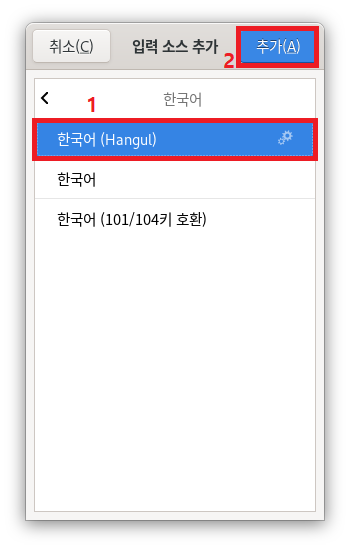


위 그림에서 Hangul 은 '한영키'를 의미
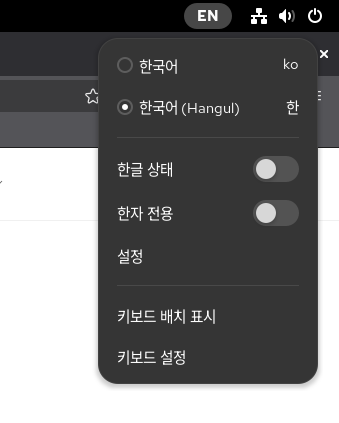
# 이후 다음 그림처럼 상단 메뉴 바 클릭하여 설정하면 됨.
2. 록키 리눅스 윈도우 파티션 마운트 및 읽기 / 쓰기
# epel 활성화
sudo dnf install epel-release -y
# ntfs-3g 패키지 설치
sudo dnf install ntfs-3g -y
3. flatpak 저장소 추가
# Flatpak 설치
sudo dnf install flatpak -y
# Flathub 저장소 추가 (Flatpak 앱이 모여있는 공식 저장소)
flatpak remote-add --if-not-exists flathub https://flathub.org/repo/flathub.flatpakrepo
# 재부팅
sudo reboot
4. 구글 크롬 설치, only office 설치
# 소프트웨어 에서 검색하여 설치
5. 시스템 업데이트
# 패키지 목록 동기화
sudo dnf check-update
# 업데이트 수행
sudo dnf update -y
# 리부트 - 커널 업데이트 된 경우
sudo reboot
6. wine 및 카톡 설치는 다음 글을 참조
https://bonghgoo.tistory.com/422
Rocky Linux 10 wine 설치
Fedora 41/42용 Wine 사용하여 성공. # Fedora 저장소 추가 (Rocky 10은 Fedora 40-41 정도와 유사)sudo dnf config-manager --add-repo https://dl.winehq.org/wine-builds/fedora/41/winehq.repo# GPG 키 가져오기sudo rpm --import https://dl.wine
bonghgoo.tistory.com
'성경 프로그램 > Linux' 카테고리의 다른 글
| Rocky Linux 10 wine 설치 (0) | 2025.11.17 |
|---|---|
| 리눅스민트 22.2 시나몬에서 액센트 등 입력하기 (0) | 2025.09.08 |
| 리눅스 폴리토닉 그릭 설정 (0) | 2025.09.08 |
| 리눅스 민트 22.4에 XAMPP로 워드프레스 로컬 설치법 (0) | 2025.08.14 |
| 리눅스민트 22.1 에서 Verbum + Bibleworks 10 실행 (0) | 2025.05.16 |


